You're visiting a website — maybe searching for a software download, reading an article, or clicking a link from an email. Suddenly, a message pops up: "Verify you're human. Press Windows+R, paste the code below, and hit Enter."
It looks exactly like one of those CAPTCHA checks you've done a hundred times. So you follow the steps.
Congratulations. You just installed malware on your own computer.
This is ClickFix — and it's currently one of the fastest-growing cyberattack methods in the world.
What Is ClickFix?
ClickFix is a type of social engineering attack, which means it tricks people rather than exploiting software bugs. Instead of breaking through your firewall or cracking your password, attackers simply convince you to do the dirty work yourself.
The attack disguises a dangerous computer command as a harmless "verification step." You paste the command into your own Windows system, hit Enter, and the malware installs silently in seconds — often before any antivirus tool can react.
It's clever, it's effective, and it's spreading fast. According to Infosecurity Magazine, ClickFix attacks surged 517% in the first half of 2025 alone, making it the second most common cyberattack vector behind phishing.
How Does It Work? (Plain English)
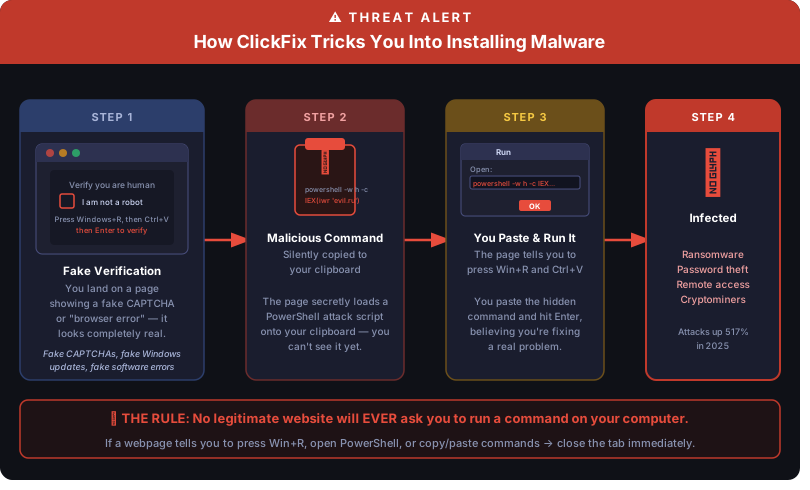
Here's what happens from the moment you land on a malicious page:
1. You see a convincing fake warning. The page shows a fake CAPTCHA check (the "I'm not a robot" box), a fake Cloudflare security screen, a fake browser error, or even a fake Windows Update splash screen. These look completely legitimate — attackers put real effort into copying the design of trusted brands.
2. A malicious command is secretly loaded onto your clipboard. While you're reading the instructions, the page quietly copies a harmful PowerShell command to your computer's clipboard — the same clipboard you use when you press Ctrl+C. You can't see it, and you have no idea it's there.
3. You're told to paste it into Windows and press Enter. The instructions say something like: "Press Windows+R, paste the code, and click OK to complete verification." You do it because it sounds like a normal tech step. What you're actually doing is opening Windows' built-in Run dialog and executing a command directly on your computer.
4. Malware installs — fast. The command downloads and runs malicious software in seconds. Depending on the attack, this could be ransomware that locks your files, a password stealer, a remote access tool that gives hackers a backdoor into your computer, or software that mines cryptocurrency using your computer's resources.
What Does It Look Like in Real Life?
ClickFix attacks show up in many disguises. Common scenarios include:
- A page pretending to be Cloudflare asking you to "verify" before viewing content
- A fake Google Chrome or Edge update that says your browser is out of date
- A phony Microsoft 365 error saying your document can't be displayed until you "fix" something
- A fake Windows Update screen that mimics the real thing almost perfectly
- Websites for legitimate services like Spectrum that have been secretly compromised by hackers
In early 2026, security researchers discovered that over 700 education and tech websites had been hijacked to serve ClickFix attacks, meaning you don't have to visit a shady website to encounter one.
Why Is It So Effective?
Two reasons:
First, it bypasses most security tools. Traditional antivirus and email filters look for malicious files and suspicious links. ClickFix doesn't send you a file or a link — it tricks you into typing a command yourself. Many security tools don't flag commands you manually run on your own computer.
Second, it exploits urgency and trust. Attackers design these pages to look urgent and official. You're told you need to complete a step to access a page or fix a problem. Most people don't stop to question a CAPTCHA — they just want to get through it.
How to Protect Yourself and Your Team
The good news: ClickFix has a very simple defense.
Know the golden rule:
No legitimate website will ever ask you to press Win+R, open PowerShell, or paste a command into your computer.
Period. If a webpage gives you those instructions — no matter how official it looks — close the tab immediately. Real CAPTCHAs only ask you to click a checkbox or identify objects in images. They never involve your keyboard shortcuts or command line.
Beyond that golden rule, here are practical steps for your business:
-
Train your team. Share this article with your staff. One trained employee who recognizes this attack can prevent a costly breach. Awareness is your strongest defense.
-
Pause before you paste. Attackers rely on urgency. If a page is pressuring you with a countdown timer or alarming language, that's a red flag — take a breath and think before acting.
-
Never run commands from a webpage. If you genuinely need to run something in PowerShell or Windows Run, that instruction should come from your IT team, not from a random website.
-
Keep systems updated. Modern versions of Windows and browsers have better protections built in. Staying current reduces your exposure.
-
Use managed security. A business-grade endpoint security solution — the kind that monitors behavior rather than just scanning files — can catch malicious scripts even if an employee accidentally runs one.
-
Call us before acting. If you ever see a suspicious message on your screen and aren't sure what to do, call PC Methods before following any instructions. It's always faster to call than to recover from a breach.
What to Do If You Think You've Been Hit
If you followed steps like those described above and are now worried your computer may be infected:
- Disconnect from the internet (unplug ethernet or turn off Wi-Fi) to prevent data from being sent to attackers
- Don't enter any passwords on that machine
- Call PC Methods immediately — (630) 208-8000
Time matters in these situations. The sooner we can assess what happened, the better the outcome.
Frequently Asked Questions
What exactly is a ClickFix attack? ClickFix is a social engineering technique where attackers trick you into running a malicious command on your own computer. They disguise the command as a routine verification step — like a CAPTCHA or a browser fix — and secretly load it onto your clipboard. When you paste and run it, malware installs in seconds.
Will my antivirus software protect me from ClickFix? Not reliably. Most antivirus and endpoint security tools look for malicious files being downloaded or suspicious links being clicked. ClickFix bypasses that entirely — because you are the one typing the command. Behavior-based security tools offer better protection, but awareness is still your strongest defense.
Can Macs be infected by ClickFix attacks? Yes. While most ClickFix attacks target Windows (using the Run dialog or PowerShell), Mac variants exist and are increasing. In May 2026, Malwarebytes documented a campaign targeting Mac users through fake search results. The same golden rule applies: no legitimate website will ask you to open Terminal and paste a command.
What's the difference between ClickFix and regular phishing? Traditional phishing tries to get you to click a malicious link or open a malicious file. ClickFix skips that step entirely — the attacker gets you to type the malicious command yourself, using your own keyboard and your own system privileges. This makes it much harder for security tools to catch.
What should I tell my employees? One sentence covers it: "If any website ever asks you to press Win+R, open PowerShell, or paste a command — close the tab and call IT immediately." Real CAPTCHAs never involve keyboard shortcuts or command-line tools. Make sure your whole team knows this rule before they encounter one of these pages.
What do I do if I accidentally ran one of these commands? Act fast. Disconnect your computer from the internet immediately (unplug ethernet or turn off Wi-Fi). Do not enter any passwords on that machine. Then call your IT provider right away — the sooner they can assess what was installed, the better the outcome.
The Bottom Line
ClickFix is a reminder that cybercriminals are constantly evolving — and that the most dangerous attacks often target human habits rather than software flaws. The best firewall in the world won't stop someone from typing a command into their own computer.
Awareness is your first line of defense. Share this post with your colleagues and family, and remember the rule: if a website tells you to run a command, run the other way.
Have questions about your business's cybersecurity posture? Contact PC Methods — we're here to help.
PC Methods | Precision Computer Methods Inc. | Elburn, IL | (630) 208-8000 | pcmethods.com