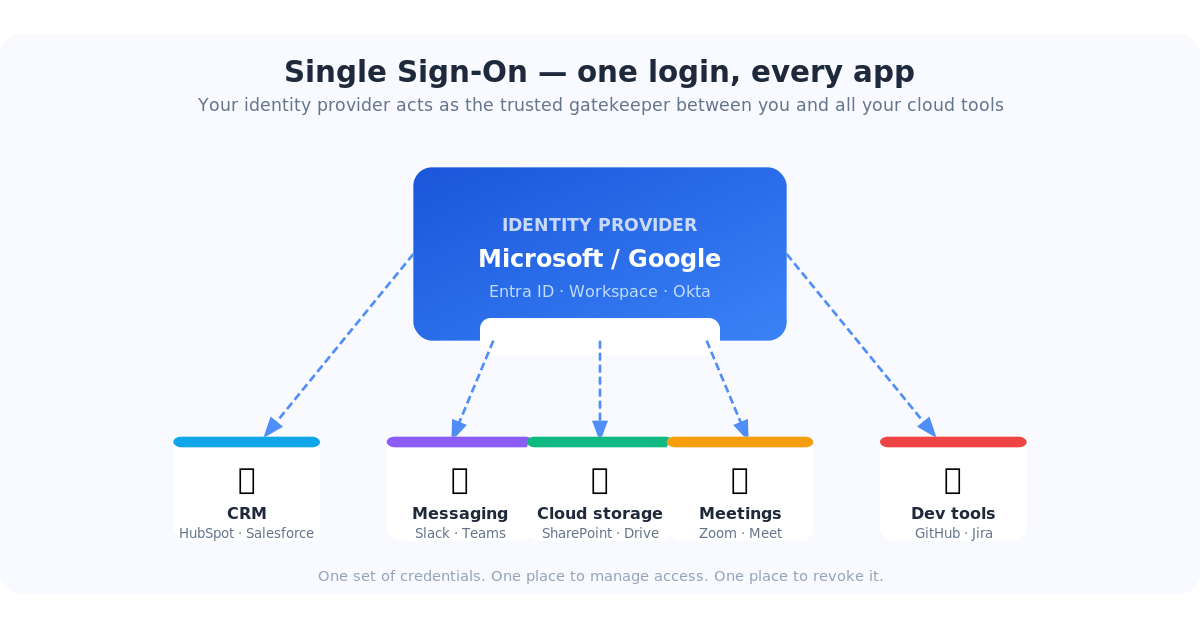
If you've ever clicked "Sign in with Microsoft" or "Log in with Google" instead of typing a password, you've already used Single Sign-On (SSO). It's one of those IT concepts that sounds complicated but is actually pretty elegant once you see what it does — and once you understand what's at risk when you skip it, it stops feeling optional.
This article breaks down what SSO is, why cloud vendors are increasingly requiring it, what's in it for both sides, when it can cause problems, and what actually happens to businesses that don't bother setting it up.
So what exactly is SSO?
Single Sign-On is exactly what the name says: one login that gets you into everything. Instead of maintaining separate usernames and passwords for HubSpot, Salesforce, Slack, Zoom, your project management tool, and every other SaaS app your team uses, you log in once — through your company's central identity provider — and you're authenticated everywhere.
Think of it like a master key for a building. Instead of carrying a different key for every door, one key opens all of them. The building knows who you are, what you're allowed to access, and logs every door you open.
Under the hood, most enterprise SSO uses a protocol called SAML 2.0 (Security Assertion Markup Language). When you try to log into an app, it sends a request to your identity provider — Microsoft Entra ID, Google Workspace, Okta, or similar. The identity provider confirms who you are and sends a signed digital certificate back to the app. The app trusts that certificate and lets you in. No password exchanged, no password stored at the app.
Your company's Microsoft or Google account becomes the single source of truth for who you are. Every connected app trusts that account instead of maintaining its own login system.
Why are cloud apps pushing SSO now?
If you've noticed more SaaS vendors nudging — or outright requiring — SSO configuration, you're not imagining it. There are a few converging reasons.
Security incidents are expensive, and vendors share the liability
The average cost of a data breach is over $4.8 million (IBM, 2024). A staggering proportion of breaches start with a stolen or reused password. When apps manage their own login systems, they become the target. When they delegate authentication to your identity provider, that attack surface shrinks dramatically — and the liability shifts.
Enterprise buyers now demand it
Any mid-size or larger company evaluating software asks the same security checklist questions: Do you support SSO? Do you support MFA? Can we centrally manage and audit access? If the answer is no, the deal often dies in procurement. Vendors who want enterprise contracts have made SSO table stakes.
Compliance frameworks require it
SOC 2, HIPAA, ISO 27001, NIST 800-171, and increasingly CMMC all require strict access controls, audit trails, and the ability to prove who accessed what and when. SSO is the cleanest way to check those boxes. Vendors who support it are easier for their enterprise customers to stay compliant — which is a selling point.
Hybrid work broke the old perimeter model
When everyone worked in the office, you could partially control access at the network level. Now that your team is working from home, hotels, and coffee shops, the network perimeter is basically gone. Identity is the new perimeter. SSO is how you enforce consistent identity-based access regardless of where someone is logging in from.
What's in it for the vendor?
Yes, vendors benefit from pushing SSO — but those benefits aren't just self-serving. They translate directly into better security for you.
- Fewer support tickets. Password resets are consistently one of the top IT helpdesk requests. When users authenticate through your identity provider, the vendor's support team stops fielding "I locked myself out" calls. Their costs drop; your users spend less time stuck.
- Cleaner user lifecycle management. When an employee is provisioned in Microsoft, they get access to everything. When their account is disabled, access to all connected apps is cut off simultaneously — automatically.
- Audit-ready logs. Every login is traceable to a verified identity. Clean logs are essential when something goes wrong and you need to know exactly who accessed what.
- Reduced attack surface. The vendor doesn't store your password anymore. No stored password means nothing to breach.
- Market positioning. "We support enterprise SSO" is a trust signal. In a crowded SaaS market, security credibility matters when selling to larger organizations.
What's in it for you and your team?
| Without SSO | With SSO |
|---|---|
| 15 different passwords to manage | One Microsoft or Google login |
| Onboarding = manual setup in every app | Onboarding = create one account, access flows automatically |
| Offboarding = hoping you remembered every app | Offboarding = disable one account, access revoked everywhere instantly |
| MFA set up separately in each app | MFA configured once, applies to all apps automatically |
| No visibility into suspicious logins | Centralized login logs, alerts for unusual activity |
The offboarding point deserves emphasis. One of the most underappreciated risks for small and mid-size businesses is ex-employees who still have active logins. It's not usually malicious — it's just that nobody thought to remove them from the project management tool or the marketing platform. With SSO, disabling their Active Directory or Entra account immediately cuts off every connected app. No checklist. No gaps.
What happens if you don't turn it on?
Skipping SSO isn't just leaving a useful feature unused. Here's the realistic impact:
Worst case: you get locked out of your apps
Many vendors now enforce SSO for accounts above a certain size or plan level. If your contract requires SSO and you haven't configured it, you can find yourself unable to add new users, unable to authenticate, or facing an enforced cutover deadline with no room to scramble. We've seen this happen — it's not pretty when it does.
Ex-employees retain access longer than they should
Without centralized authentication, every app is an island. When someone leaves, IT has to manually remove them from each one. Things get missed — especially for apps set up by a department head without IT involvement. Lingering access from former employees is one of the most common root causes of insider data incidents.
Shadow IT multiplies
When employees can't get easy access through official channels, they improvise. Marketing signs up for a new tool using someone's personal Gmail. The account is permanently disconnected from IT, impossible to audit, and becomes an orphan if that person leaves.
Password reuse puts multiple systems at risk simultaneously
If your team reuses the same password across your CRM, email, and a third-party tool, and that third-party tool gets breached, attackers now have credentials that may work elsewhere. SSO eliminates passwords at the app level entirely — there's nothing to reuse.
Compliance audits get uncomfortable
Auditors asking "who has access to your critical systems, and how do you know?" expect a clean answer. "We gave everyone passwords and we think they're current" is not that answer. SSO gives you a single pane of glass for access management and a clean audit trail to back it up.
When SSO can bite you — and how to plan for it
Here's the part most articles skip. SSO is genuinely great — but it introduces a specific set of risks that you need to plan around. Think of it as centralizing your security: all the benefits come with the downside that your single point of control can also become a single point of failure.
Your identity provider goes down, and so does everything
If Microsoft Entra ID or Google Workspace has an outage — even a partial one — nobody can log into any SSO-connected app. This has happened. Microsoft and Google publish status pages, but that's cold comfort when your team is locked out of the CRM during a critical sales push. Mitigation: keep at least one break-glass admin account in each critical app that authenticates with a strong password and MFA — purely for outage scenarios. Document it, lock it in a password manager, and test it once a year.
Misconfiguration can lock everyone out instantly
When you first configure SSO for an app and flip the switch, it applies immediately to everyone. If something is misconfigured — wrong ACS URL, expired certificate, wrong issuer string — every user gets an error on their next login attempt. Mitigation: always test SSO with a single test account before enabling it org-wide. Most platforms let you do this. Also, keep a back-door admin login active until you've confirmed SSO is working for real users.
Certificate expiration silently breaks everything
SAML SSO uses an X.509 digital certificate to sign authentication requests. These certificates expire — typically every 1 to 3 years. When a cert expires, SSO stops working. For everyone. At once. With an error message that most users won't understand. Mitigation: set a calendar reminder 60 days before your certificate expiry date. Most identity providers let you rotate certificates with no downtime if you plan ahead — but it's a scramble if you only notice when the helpdesk starts flooding with login errors.
A stolen SSO credential is now a master key
The flip side of "one login for everything" is that if someone's SSO credentials are compromised — through phishing, malware, or a weak password — the attacker has access to every app connected to that account. This is why SSO should always be paired with strong MFA. The credential alone should never be enough. Mitigation: enforce MFA in your identity provider (Entra, Google Workspace, Okta). With MFA on, a stolen password is useless without the second factor.
Service accounts and shared logins get awkward
SSO works cleanly for individual users with real accounts. It gets messy with shared logins (like a social media account five people all access), service accounts used by integrations, or tools where someone used a personal email to sign up years ago. Mitigation: audit your app logins before configuring SSO. Identify any shared or personal-account logins and migrate them to proper service accounts before you flip the switch.
Vendors with buggy SSO implementations
Not every SSO implementation is created equal. Some apps have known quirks — they log you out unexpectedly, don't handle session timeouts gracefully, or behave oddly after a certificate rotation. Mitigation: test thoroughly after any configuration change. Keep an eye on vendor release notes when they update their SSO module. If a specific app repeatedly causes login issues after SSO is enabled, check their support knowledge base — the fix is usually documented.
SSO moves from "many small risks spread across many apps" to "fewer, larger risks in one central place." The net security posture is significantly better — but only if you actively manage that central place with MFA, break-glass accounts, and certificate monitoring.
Getting started
If you're already on Microsoft 365 or Google Workspace, the identity provider is already in place. Getting started is a matter of connecting your apps to it.
- Identify your top-priority apps. Start with the apps that hold the most sensitive data or that the whole company uses daily — your CRM, project management tool, communication platform.
- Check if SSO is available on your current plan. Many vendors offer SAML SSO on Professional or Enterprise tiers. If it's not on your current plan, evaluate whether the upgrade cost is worth it — for apps with sensitive data, it usually is.
- Set up a test account first. Never configure and enable SSO for an app without testing it on one account before rolling it out to everyone.
- Create a break-glass account. Before enabling SSO, make sure there's a local admin credential in each critical app that works without SSO — in case you ever need it.
- Note your certificate expiry date. Set a calendar reminder 60 days out.
- Work through the rest of your app stack systematically. Once you've done a few, the pattern becomes quick and familiar.
Typical setup time: 30–60 minutes per app for the first few, faster once you know the pattern. For most apps, it's just copying and pasting a handful of URLs and a certificate between two configuration pages.
FAQ
Do I need special software to use SSO?
Not if you're already on Microsoft 365 or Google Workspace — the identity provider is built in. Larger organizations sometimes use a dedicated identity platform like Okta or Ping Identity, but for most small and mid-size businesses, Microsoft Entra ID or Google Workspace is all you need.
Is SSO the same as MFA?
No, but they're designed to work together. SSO is about where you authenticate (one central place). MFA is about how you prove it's really you (a second factor like an authenticator app or hardware key). Configure MFA in your identity provider and it automatically applies to every SSO-connected app. That combination is the gold standard.
What if an employee forgets or loses their Microsoft credentials?
They lose access to everything connected via SSO until it's restored — which sounds alarming until you realize it's exactly the behavior you want. A compromised credential is revoked in one place, not chased down across 15 apps. IT resets the account once and access is restored everywhere simultaneously.
Some of our apps are on plans that don't support SSO. What do we do?
For those apps, use a password manager with unique, strong, randomly generated passwords. It's the next-best option. For apps that handle genuinely sensitive data, evaluate whether upgrading to an SSO-capable tier is justified — the per-user cost is often less than most people expect.
Can we turn off SSO if something goes wrong?
Yes — most platforms let you revert to password-based login from the admin console. This is why the break-glass admin account matters: it's how you log in to make that change if SSO itself is what's broken.